I'm Morgan McGuire (@CasualEffects). I've been working on computer graphics and games for 20 years at great places including NVIDIA, University of Waterloo, Williams College, Brown University, Roblox, Unity, and Activision.
See my home page for a full index of my blog posts, books, research, and projects.
Monday, December 2, 2013
Monday, September 16, 2013
The Skylanders SWAP Force Depth-of-Field Shader
![]() |
| Our depth of field effect in the game. |
Tuesday, September 3, 2013
The Graphics Codex Web Edition
The essential reference for computer graphics is now available on all platforms through the Graphics Codex Web Edition.
![]() |
| Sample Radiometry diagram |
“ I own and use the Graphics Codex. Is it a reference tool, a companion to a textbook, an alternative to a textbook, or a self-study guide? It can work in any of these roles, but I think it is in fact a new thing. It's a thing we'll be seeing a lot of...dollar for dollar, it's the best scholarly information I have ever purchased.”—Peter Shirley, University of Utah
coauthor of Fundamentals of Computer Graphics
Friday, August 16, 2013
Plausible Environment Lighting in Two Lines of Code
a group post by McGuire, Evangelakos, Wilcox, Donow, and Mara
(Because of intense interest in this post, we archived it as a technical report at http://graphics.cs.williams.edu/papers/EnvMipReport2013/ suitable for scientific citation)
This post describes a trick used in the G3D Innovation Engine 9.00 to produce reasonable real-time environment lighting for glossy surfaces. It specifically adds two lines of code to a pixel shader to reasonably approximate Lambertian and glossy reflection (under a normalized Phong model) of a standard cube map environment. This trick resulted from an afternoon discussion/challenge last week in the Williams Computational Graphics lab between Morgan McGuire (that's me), my summer 2013 research students, Dan Evangelakos (Williams), James Wilcox (NVIDIA and University of Washington), Sam Donow (Williams), and my NVIDIA colleague and former student Michael Mara.
There are many more sophisticated ways of computing environment lighting for real-time rendering (see Real-Time Rendering's survey or a more informal Google search). Unfortunately, those techniques tend to require an offline asset build step, so they can't be directly applied to dynamic light probes, which are particularly interesting to us...although there are some clever things that one can do with spherical harmonics to reduce the cost of that precomputation a lot. Those methods also tend to require a specific setup for the renderer that doesn't work with our default shaders. For research and hobbyist rendering, one often has to work with off-the-shelf or legacy assets. This situation also arises in production more than one might think, especially when working with games that run across a variety of devices.
![]() |
| A series of increasingly shiny teapots, before and after applying this technique. In the before row, only the perfect-mirror (rightmost) teapot reflects the environment. |
Wednesday, August 14, 2013
Z-Prepass Considered Irrelevant
The G3D Innovation Engine directly supports easy switching between forward, forward+, and deferred rendering. Most programs, including the starter sample, begin rendering with a z-prepass regardless of which mode they are operating in. This ensures that (except for translucent surfaces and partial coverage) shading occurs once per sample. The z-prepass operation is a depth-only render pass that bypasses the fragment shader (except when a surface has an alpha mask), and it processes fragment-bound scenes in about 1/3 the time of a regular shading pass on NVIDIA GPUs, which have special fixed-function support for depth-only rendering.Tuesday, August 13, 2013
A Really Smart Enum in C++
For the G3D Innovation Engine, I wanted much richer enumerated type functionality than C++ enum (or even recent extensions) provide, without the template error nightmares and complexity of something like the Boost library's enums or X macros. I also did not want to use non-standard compiler extensions or an offline code generator; portability and minimal maintenance are important for my multi-platform code and small development team. I call my solution "really smart enums" because they extend the so-called C++ Intelligent Enum design pattern. The solution that I used allows all of the following:
Tracewords Makeover
I'll be releasing Tracewords shortly. This is a casual word game written with codeheart.js that is designed for one-handed (one-thumb, really) play on mobiles. I implemented the mechanics a year ago. To prepare for release I needed three major features:
Favorite Films from Annecy 2013
Top three:
2. Will
Eusong Lee 2012
The saddest and most emotionally effective short I have ever seen at the festival. I cried and wanted to run from the theatre once it became clear where this was going. If the last 15 seconds were cut, then it would be perfect.
3. La Grosse Bête
Pierre-Luc Granjon 2013
Well animated, with a compelling story. This also acts as a precise allegory in a world debating civil rights vs. security. The timing and direction are flawless and masterful.
Other highlights:
Les Voiles du Partage
Pierre Mousquet and Jerome Cauwe 2013
Mad Max meets Charles Bronson for a fast-paced dystopian satire. It is great to have some films that are just fun!
Nysuzi es Oz (Rabbit and Deer)
Peter Vacz 2012
2D meets 3D, and science is the original sin.
Duku Spacemarines
Nicolas Liautaud, Alice Suret-Canale, Hugo Paquin, and Nicolas Dubois 2012
For every student whose film or game design included "and one more awesome thing..."
Beach
Pawel Prewencki 2012
A simple vignette of the beach, with one cynical note.
Betty's Blues
Claymation and animated woodcut bringing to life a set of three blues songs; the stories are dark but presented more cheerfully than you might expect.
Trespass
Paul Wenninger 2012
A stop-motion live-action journey of epic scope; the music-video like novelty wears off after a minute and the impact then begins. I believe that the actor was also the director. His performance is particularly impressive--it would be hard to maintain that composure over such long stop-motion scenes.
The Caketrope of Burton's Team
Axelandre Dubosc 2012
A chocolate cake zoetrope in homage to Tim Burton.
But Milk Is Import
Anna Mantzaris, Eirik Gronmo Bjornsen 2012
Shy guy meets shy girl in stop motion with lots of knitting and felt.
Kick-Heart
Masaaki Yuasa
Japanese insanity, with manga tropes.
History of Pets
Kris Genijn 2013
The pets don't fare so well in this funny and lighthearted tragedy.
A Girl Named Elastika
Guillaume Blanchet
The journey of a rubber band girl across a cork board in thumb-tack stop motion. A fresh look and self-deprecating presentation.
Balance and Swing
Anne Beal 2012
A beautiful watercolor from RISD.
Aux Gambettes Gourmandes
A light powder (think sand and sugar painting) animation with a fun and accurate twist.
Boles
Spela Cadez 2013
Extremely smooth and self-contained Kafkaesque stop-motion. Women in Annecy shorts regrettably tend to caricatures: nurturing mothers, children, thin beautiful 20-something sex objects, grandmothers, or extremely fat. This one had a much more interesting character.
The program this year seemed heavy on slow, depressing films about child abuse and refugees. These are seldom my own favorites because, while the subjects are of course important, they very hard to present in a novel or nonobvious way, and thus tend to disappoint as art and are underrepresented in my list.
I noted fewer films from North America and from Japan this year. Monsters University was shown in 3D and was good, and technically perfect although I found the story and cinematography less compelling than Pixar's previous best films. New work by Monty Python and Bill Plympton was good but not as exceptional as we have come to expect.
Bonus! A favorite from last year is now online: Una Furtiva Lagrima
Morgan McGuire is a professor of Computer Science at Williams College and a professional game developer. He is the author of The Graphics Codex, an essential reference for computer graphics that runs on iPhone, iPad, and iPod Touch.
1. Miss Todd
Kristina Yee 2013
A paper-cutout musical, historical fiction (pleasantly heavy on facts), feminist tract, and fun story. That it was also a student graduation film is amazing. This was my favorite film of the festival.
![]() |
| Miss Todd |
A paper-cutout musical, historical fiction (pleasantly heavy on facts), feminist tract, and fun story. That it was also a student graduation film is amazing. This was my favorite film of the festival.
2. Will
Eusong Lee 2012
The saddest and most emotionally effective short I have ever seen at the festival. I cried and wanted to run from the theatre once it became clear where this was going. If the last 15 seconds were cut, then it would be perfect.
3. La Grosse Bête
Pierre-Luc Granjon 2013
Well animated, with a compelling story. This also acts as a precise allegory in a world debating civil rights vs. security. The timing and direction are flawless and masterful.
Other highlights:
Pierre Mousquet and Jerome Cauwe 2013
Mad Max meets Charles Bronson for a fast-paced dystopian satire. It is great to have some films that are just fun!
![]() |
| Rabbit and Deer |
Nysuzi es Oz (Rabbit and Deer)
Peter Vacz 2012
2D meets 3D, and science is the original sin.
Duku Spacemarines
Nicolas Liautaud, Alice Suret-Canale, Hugo Paquin, and Nicolas Dubois 2012
For every student whose film or game design included "and one more awesome thing..."
Beach
Pawel Prewencki 2012
A simple vignette of the beach, with one cynical note.
Betty's Blues
Claymation and animated woodcut bringing to life a set of three blues songs; the stories are dark but presented more cheerfully than you might expect.
Trespass
Paul Wenninger 2012
A stop-motion live-action journey of epic scope; the music-video like novelty wears off after a minute and the impact then begins. I believe that the actor was also the director. His performance is particularly impressive--it would be hard to maintain that composure over such long stop-motion scenes.
![]() |
| But Milk is Important |
The Caketrope of Burton's Team
Axelandre Dubosc 2012
A chocolate cake zoetrope in homage to Tim Burton.
But Milk Is Import
Anna Mantzaris, Eirik Gronmo Bjornsen 2012
Shy guy meets shy girl in stop motion with lots of knitting and felt.
Kick-Heart
Masaaki Yuasa
Japanese insanity, with manga tropes.
History of Pets
Kris Genijn 2013
The pets don't fare so well in this funny and lighthearted tragedy.
A Girl Named Elastika
Guillaume Blanchet
The journey of a rubber band girl across a cork board in thumb-tack stop motion. A fresh look and self-deprecating presentation.
Balance and Swing
![]() |
| Balance and Swing |
A beautiful watercolor from RISD.
Aux Gambettes Gourmandes
A light powder (think sand and sugar painting) animation with a fun and accurate twist.
Boles
Spela Cadez 2013
Extremely smooth and self-contained Kafkaesque stop-motion. Women in Annecy shorts regrettably tend to caricatures: nurturing mothers, children, thin beautiful 20-something sex objects, grandmothers, or extremely fat. This one had a much more interesting character.
The program this year seemed heavy on slow, depressing films about child abuse and refugees. These are seldom my own favorites because, while the subjects are of course important, they very hard to present in a novel or nonobvious way, and thus tend to disappoint as art and are underrepresented in my list.
I noted fewer films from North America and from Japan this year. Monsters University was shown in 3D and was good, and technically perfect although I found the story and cinematography less compelling than Pixar's previous best films. New work by Monty Python and Bill Plympton was good but not as exceptional as we have come to expect.
Bonus! A favorite from last year is now online: Una Furtiva Lagrima
Morgan McGuire is a professor of Computer Science at Williams College and a professional game developer. He is the author of The Graphics Codex, an essential reference for computer graphics that runs on iPhone, iPad, and iPod Touch.
Sunday, August 11, 2013
Big Graphics Codex changes in Aug & Sept
Over 1000 of 3D programmers, researchers, and graphics students already use the Graphics Codex app--I can see not only the original sales, but how many download the free updates each month. For the last two years the app has been essentially underground. Sales are driven solely by word of mouth and I have no advertising. This was a quiet start appropriate for an app that began by just releasing my course lecture notes in a mobile form factor, and only later grew towards comprehensive coverage.
Now that the Graphics Codex has 224 entries, including an entire course of lecture notes on physically-based rendering and new topics ranging from HTML5 to the biology of the human eye, it is time to upgrade both the app and the distribution strategy. In mid-August, I'll release version 2.0. I have already submitted it to Apple and am just waiting for App-store approval for release. This contains a reworking of the UI code for responsiveness and clarity. Here's the full change log:
This really is a "2.0"--the entire scrolling, selection, and layout engines have been rewritten for performance and robustness. The 1.9 version introduced the iOS 7 interface, which is retroactively available back to iOS 5.
I plan two more rapid-fire updates, for August and September. The first will include more UI features that need additional testing, such as the interactive graphs and retaining your place on a page when navigating between topics. Other UI features like printing are on the task list but may not make these short-term updates. I try to ship once a month with whatever is ready, rather than holding a release on a specific feature.
This update will be accompanied by an academic marketing campaign run by Alice Peters (cofounder of A K Peters), whom I've had the pleasure to work with on many projects in the past. It is time to get the word out about the app as the perfect complement for traditional textbooks in the classroom. In the last six years (long before it was publicly available!), I used the Graphics Codex in teaching at Williams as a companion to Fundamentals of Computer Graphics, Real-Time Rendering, and Computer Graphics: Principles and Practice in different semesters. I tuned the material for the app to work well with all three of these popular texts.
The September update will follow shortly after Apple's expected early-September product announcements. It will include additional iOS 7 support and increased coverage of GPU and rasterization topics. I'll post more information about this and another significant announcement about the Graphics Codex at the end of August.
Morgan McGuire is a professor of Computer Science at Williams College and a professional game developer. He is the author of The Graphics Codex, an essential reference for computer graphics that runs on iPhone, iPad, and iPod Touch.
Saturday, August 3, 2013
Starfield Shader
I'm preparing assets for an upcoming mini-game jam/hackathon. My current plan is to make a spaceship video game inspired by Galaxy Trucker, in which you build and then fly a ship. This post is about the starfield shader that I created by modifying Kali's amazing Star Nest shader on Shadertoy to fit into the game framework.
The starfield renders in 3.7ms at 1080p on GeForce 650M (the Kepler GPU in a 2012 Macbook Pro) on Windows 7 64-bit, including upsample time. It is procedural, so it has effectively infinite extent and fine detail down to the pixel level, and has parallax as it scrolls.
I was only willing to spend 25% of the frame time on the background. To keep the performance high, I render downsampled by 2.5x in each direction to an RGB8 texture and then bilinearly interpolate up to full screen resolution.
Here's the GLSL shader:
The preamble uses some G3D-specific shader preprocessing. #expect declares a macro argument, G3D allows multiple version numbers and promotes the highest one to the first line, and implements #include. The compatibility.glsl file smoothes over differences between GLSL versions and between GLSL and HLSL.
At its heart is the "KaliSet" iterated function p := | p | / | p |2 - k. I tuned the constants for the specific look I was targeting and for performance. It is of course very performance sensitive to the number of iterations of the inner loop and the number of volumetric steps. I also extracted some of the expressions into uniforms in a way that the Shadertoy framework wouldn't have allowed for the original. I tried using the max component or the average component in place of the expensive length() call, but this creates a 3-fold symmetry on some "suns" that is undesirable.
In my game, the background will move slowly as the ship flies. Very bright single pixels flicker in and out of existence as they are undersampled with the unmodified shader, so I suppressed these cheaply using derivative instructions and blending in against the previous frame. The previous frame blending is primarily there to create motion blur and soften the background under motion to keep attention on the shops. I also wiggle the screen by a random offset of up to 1/3 pixel when the camera is still. This makes stars appear to twinkle and closes the visual difference between the slightly-incoherent rendering under motion and when still.
Morgan McGuire is a professor of Computer Science at Williams College and a professional game developer. He is the author of The Graphics Codex, an essential reference for computer graphics that runs on iPhone, iPad, and iPod Touch.
![]() |
| The starfield |
I was only willing to spend 25% of the frame time on the background. To keep the performance high, I render downsampled by 2.5x in each direction to an RGB8 texture and then bilinearly interpolate up to full screen resolution.
Here's the GLSL shader:
// -*- c++ -*-
// \file starfield.pix
// \author Morgan McGuire
//
// \cite Based on Star Nest by Kali
// https://www.shadertoy.com/view/4dfGDM
// That shader and this one are open source under the MIT license
//
// Assumes an sRGB target (i.e., the output is already encoded to gamma 2.1)
#version 120 or 150 compatibility or 420 compatibility
#include <compatibility.glsl>
// viewport resolution (in pixels)
uniform float2 resolution;
uniform float2 invResolution;
// In the noise-function space. xy corresponds to screen-space XY
uniform float3 origin;
uniform mat2 rotate;
uniform sampler2D oldImage;
#define iterations 17
#define volsteps 8
#define sparsity 0.5 // .4 to .5 (sparse)
#define stepsize 0.2
#expect zoom
#define frequencyVariation 1.3 // 0.5 to 2.0
#define brightness 0.0018
#define distfading 0.6800
void main(void) {
float2 uv = gl_FragCoord.xy * invResolution - 0.5;
uv.y *= resolution.y * invResolution.x;
float3 dir = float3(uv * zoom, 1.0);
dir.xz *= rotate;
float s = 0.1, fade = 0.01;
gl_FragColor.rgb = float3(0.0);
for (int r = 0; r < volsteps; ++r) {
float3 p = origin + dir * (s * 0.5);
p = abs(float3(frequencyVariation) - mod(p, float3(frequencyVariation * 2.0)));
float prevlen = 0.0, a = 0.0;
for (int i = 0; i < iterations; ++i) {
p = abs(p);
p = p * (1.0 / dot(p, p)) + (-sparsity); // the magic formula
float len = length(p);
a += abs(len - prevlen); // absolute sum of average change
prevlen = len;
}
a *= a * a; // add contrast
// coloring based on distance
gl_FragColor.rgb += (float3(s, s*s, s*s*s) * a * brightness + 1.0) * fade;
fade *= distfading; // distance fading
s += stepsize;
}
gl_FragColor.rgb = min(gl_FragColor.rgb, float3(1.2));
// Detect and suppress flickering single pixels (ignoring the huge gradients that we encounter inside bright areas)
float intensity = min(gl_FragColor.r + gl_FragColor.g + gl_FragColor.b, 0.7);
int2 sgn = (int2(gl_FragCoord.xy) & 1) * 2 - 1;
float2 gradient = float2(dFdx(intensity) * sgn.x, dFdy(intensity) * sgn.y);
float cutoff = max(max(gradient.x, gradient.y) - 0.1, 0.0);
gl_FragColor.rgb *= max(1.0 - cutoff * 6.0, 0.3);
// Motion blur; increases temporal coherence of undersampled flickering stars
// and provides temporal filtering under true motion.
float3 oldValue = texelFetch(oldImage, int2(gl_FragCoord.xy), 0).rgb;
gl_FragColor.rgb = lerp(oldValue - vec3(0.004), gl_FragColor.rgb, 0.5);
gl_FragColor.a = 1.0;
}
The preamble uses some G3D-specific shader preprocessing. #expect declares a macro argument, G3D allows multiple version numbers and promotes the highest one to the first line, and implements #include. The compatibility.glsl file smoothes over differences between GLSL versions and between GLSL and HLSL.
At its heart is the "KaliSet" iterated function p := | p | / | p |2 - k. I tuned the constants for the specific look I was targeting and for performance. It is of course very performance sensitive to the number of iterations of the inner loop and the number of volumetric steps. I also extracted some of the expressions into uniforms in a way that the Shadertoy framework wouldn't have allowed for the original. I tried using the max component or the average component in place of the expensive length() call, but this creates a 3-fold symmetry on some "suns" that is undesirable.
In my game, the background will move slowly as the ship flies. Very bright single pixels flicker in and out of existence as they are undersampled with the unmodified shader, so I suppressed these cheaply using derivative instructions and blending in against the previous frame. The previous frame blending is primarily there to create motion blur and soften the background under motion to keep attention on the shops. I also wiggle the screen by a random offset of up to 1/3 pixel when the camera is still. This makes stars appear to twinkle and closes the visual difference between the slightly-incoherent rendering under motion and when still.
Morgan McGuire is a professor of Computer Science at Williams College and a professional game developer. He is the author of The Graphics Codex, an essential reference for computer graphics that runs on iPhone, iPad, and iPod Touch.
Friday, June 28, 2013
iOS 7 Style for The Graphics Codex
I'm working on the release of version 1.9 of The Graphics Codex. The new features will be available on all supported versions of iOS, which means iOS 7 back through iOS 5.1. So, even iOS 5.1 and iOS 6.x will look like iOS 7! I've wanted to implement a cleaner UI for a long time but felt that keeping the UI consistent with the latest version of iOS was important initially.
The new version contains interactive graphs and new graphics content as well as the new interface. It has the same fast interface, crisp text layout, and searchable index as the previous versions. All of the content is in the app, so that it works without a network connection.
Now that the iOS feature set is highly polished, I'm also looking at solutions for other platforms like Android. I'll announce plans once I've worked out the technical details and know exactly how those versions will work.
Morgan McGuire is a professor of Computer Science at Williams College and a professional game developer. He is the author of The Graphics Codex, an essential reference for computer graphics that runs on iPhone, iPad, and iPod Touch.
Tuesday, May 28, 2013
Pixel Art Evolution
I've been working on a dungeon crawl cooperative ARPG with my children in the evenings. Our emphasis is on design and interaction, not graphics. To keep art time low and accomodate the very small characters, I chose a 2D pixel-art style. I began by purchasing low fidelity 8x8 sprites from Oryx Design Lab and upsampling them using hq4x (in this case, using Darnell's Depixelizer). This enabled me to bring the implementation to playtesting in a few hours. Having reasonable initial graphics was important for my co-designers, who aren't as willing to identify with programmer art.
As the game became more refined, I revisited the sprites and redrew many of them to add increased detail and match the features of their corresponding character portraits.
The images above show the evolution of two characters: the human female Ranger (currently named d'Arc) and the dwarven male Builder Crefftwyr. This is frame 0 of each of their idle animations. The in-game shots are less sharp because the engine renders at fixed high resolution and then filters down to the current screen resolution. The result reminds me of the early game consoles of my own childhood when displayed on 1980's television.
To make the Ranger appear female, I narrowed the waist by one pixel on the upsampled size, pulled in her right cheek, and added long hair. To make the hair stand out, I traced a thin dark outline around her cowl. The final touch was adding a small mouth. Many of the other male characters (not shown) look acceptable without mouths, but somehow defining the mouth increased a sense of delicacy and precision in the face. I tried adjusting the neckline of her shirt, but at scale it just read as a larger head and not an exposed neck.
The challenge in drawing the Builder was emphasizing the classic fantasy dwarven racial characteristics at small scale. I pushed his head down so that he fit in 8x7 instead of 8x8 and then cheated and shaved another pixel off his legs in the upsampled 32x24 version. Making the right-side eye triangular and drawing in an eyebrow gave the appearance of a large nose. I thickened his arms by one pixel and raised the shoulders to increase the hunchback appearance.
Morgan McGuire is a professor of Computer Science at Williams College and a professional game developer. He is the author of The Graphics Codex, an essential reference for computer graphics that runs on iPhone, iPad, and iPod Touch.
Thursday, May 23, 2013
Upsampling Pixel Art with Alpha on OS X
It is easy to find low-resolution pixel art "sprites" for indie games, for example, by browsing the legally-distributed, Creative-Commons-licensed art at OpenGameArt.org. Such sprites are popular partly for their nostalgia factor for 30-something developers, but I think primarily because such low-fidelity graphics are easier both for indies to produce and to match surrounding image quality for. I use such art extensively in my teaching programming samples and jam games.
Unfortunately, in a world of high-resolution displays, 32x32 pixel art sprites are simply too small. Nearest neighbor upsampling retains the pixel quality but often (to my eyes) plays up the lo-fi nature a bit too much. I prefer to increase sprite resolution using a pseudo-vectorizing filter such as Maxim Stepin's hq4x. It yields results like this:
There are several open source implementations of hq4x available. Finding one that actually builds without a number of dependencies and supports your operating system (mine is OS X when doing artwork) is tricky, however.
I use Nelson's Windows + Linux implementation (which works fine for OS X if you compile from the Makefile) that simply wraps Maxim's code and doesn't introduce any library dependencies. To install this on OS X:
If you like this particular space ship, then you can download the set of 12 that I created by the process described here (as Public Domain content) at http://opengameart.org/content/2d-spaceship-sprites-with-engines.
In closing, I'd like to note that there is still a great need for all-in-one pixel art resampling, and providing this would be a great way for a junior game developer or Ph.D. student to gain great exposure. One could provide a simple, artist-ready tool that wraps hq4x and directly supports input alpha, or perform true vectorization for more significant upsampling, say, in the style of Depixelizing Pixel Art.
Morgan McGuire is a professor of Computer Science at Williams College and a professional game developer. He is the author of The Graphics Codex, an essential reference for computer graphics that runs on iPhone, iPad, and iPod Touch.
Unfortunately, in a world of high-resolution displays, 32x32 pixel art sprites are simply too small. Nearest neighbor upsampling retains the pixel quality but often (to my eyes) plays up the lo-fi nature a bit too much. I prefer to increase sprite resolution using a pseudo-vectorizing filter such as Maxim Stepin's hq4x. It yields results like this:
![]() | ![]() |
| Before | After |
There are several open source implementations of hq4x available. Finding one that actually builds without a number of dependencies and supports your operating system (mine is OS X when doing artwork) is tricky, however.
I use Nelson's Windows + Linux implementation (which works fine for OS X if you compile from the Makefile) that simply wraps Maxim's code and doesn't introduce any library dependencies. To install this on OS X:
- Download the source from http://www.somebits.com/weblog/tech/hqnx/
- Double-click to unzip the code
- Type "sudo make install" in the directory to compile the programs
The resulting script doesn't work correctly because it uses the Linux-specific tempfile command and because the hqnx code doesn't write correct .bmp files out. I originally started patching this, but found that it was easier to simply invoke the hqx routines directly on .tga files, which it handles fine. To upsample artwork simply use:
hq4x source.tga destination.tga
This process does not preserve alpha (transparency). There are some variants that do support alpha, but again, it was easier for me to solve this problem in Photoshop. I paint backgrounds green (0, 255, 0) and then use the free Photoshop Green Screen filter. You can also roll your own green (or other) screen removal code, since the algorithms were published by Smith and Blinn in 1996.
Here's the process for a spaceship that I downloaded from http://opengameart.org/content/modular-ships and then modified:
If you like this particular space ship, then you can download the set of 12 that I created by the process described here (as Public Domain content) at http://opengameart.org/content/2d-spaceship-sprites-with-engines.
In closing, I'd like to note that there is still a great need for all-in-one pixel art resampling, and providing this would be a great way for a junior game developer or Ph.D. student to gain great exposure. One could provide a simple, artist-ready tool that wraps hq4x and directly supports input alpha, or perform true vectorization for more significant upsampling, say, in the style of Depixelizing Pixel Art.
Morgan McGuire is a professor of Computer Science at Williams College and a professional game developer. He is the author of The Graphics Codex, an essential reference for computer graphics that runs on iPhone, iPad, and iPod Touch.
Saturday, May 11, 2013
Sol LeWitt and Voxel Ambient Occlusion
I've previously written about the relationship between the work of artist Sol LeWitt and computer science. Some representative geometric works by Lewitt include:
Note the exploration of the regular grid, mathematical patterns, tone and contrast, and light and shadow. The image that I created below follows in this vein of patterns in (exhaustive) combinatorial art and, I fancy, echoes LeWitt's interests.
Morgan McGuire is a professor of Computer Science at Williams College and a professional game developer. He is the author of The Graphics Codex, an essential reference for computer graphics that runs on iPhone, iPad, and iPod Touch.
Note the exploration of the regular grid, mathematical patterns, tone and contrast, and light and shadow. The image that I created below follows in this vein of patterns in (exhaustive) combinatorial art and, I fancy, echoes LeWitt's interests.
Each tile in this image is a top view of a square of a white plane. The square is akin to the center of a Tic-Tac-Toe (UK: Naughts and Crosses) surrounded by up to eight white cubes in the adjacent squares. Those boxes are cropped out, so that only the effects of shadowing on the central square are present. That is, this is the complete set of ambient occlusion masks needed in a voxel system (such as Minecraft).
Each of the surrounding squares on the 3x3 grid of the Tic-Tac-Toe board may have a shadowing cube present or not. If you think of "there is a cube here" as the digit 1 and "there is no cube here" as the digit 0, then these patterns correspond to the possible values of an 8-digit binary number...there are 28=256 of them. Of course, many of these are duplicates. For example, once the horizontal and vertical squares are filled, no additional shadowing can come from corners. So, there are 24=32 tiles that look like the one in the lower-right.
I created these tiles using the G3D Innovation Engine to generate all possible scenes of this description and then applied the Scalable Ambient Obscurance algorithm (which is built into G3D) to efficiently generate the shadowing. I then used Image Magick's montage tool to combine them to produce this image. The idea for generating tiles in this way is due to Mike Mara at NVIDIA. Below is an image showing their application for efficient illumination effects for the codeheart.js expert "orthovoxel" example. The left image has no ambient occlusion. The right image uses these tiles to produce dynamic ambient occlusion in real-time.
Morgan McGuire is a professor of Computer Science at Williams College and a professional game developer. He is the author of The Graphics Codex, an essential reference for computer graphics that runs on iPhone, iPad, and iPod Touch.
Wednesday, May 8, 2013
This may be a good time to learn some Computer Science
According to the US Bureau of Labor Statistics, students who start on a computer science degree are far more likely to find employment in the years after their graduation. Other science and engineering fields will have a labor oversupply, but CS will be drastically undersupplied:

Morgan McGuire is a professor of Computer Science at Williams College and a professional game developer. He is the author of The Graphics Codex, an essential reference for computer graphics that runs on iPhone, iPad, and iPod Touch.

Morgan McGuire is a professor of Computer Science at Williams College and a professional game developer. He is the author of The Graphics Codex, an essential reference for computer graphics that runs on iPhone, iPad, and iPod Touch.
Saturday, May 4, 2013
SSH with command-line password on OS X and Linux
Sometimes you have to connect via SSH or SCP to another machine inside of a script. For example, when I update the codeheart.js website, I do so by running a script that builds the site, examples, and documentation, and then uploads them via SCP with multiple commands. Since the connection is launched by a script, it is inefficient..and annoying...to repeatedly type the password for SSH each time that the script needs it. There are some common solutions to this problem, which don't happen to work well if your environment is OS X or Linux, or you don't have permission (or inclination) to modify the accounts to which you are connecting, or the accounts that you're connecting to have remotely-hosted file systems. Those common solutions are kerberos authentication forwarding/sshagent, TortoisePlink's windows SSH password option, and editing the known_hosts + authorized_keys files.
My solution is to use the Unix "expect" domain-specific language to trick SSH into communicating with a virtual terminal, and then programming the input that it receives until the connection is established. The script below runs on OS X and Linux and allows you to supply a password on the command line. I implemented this script to terminate with an interactive prompt, but you could instead close the connection after the remote command executes.
Morgan McGuire is a professor of Computer Science at Williams College and a professional game developer. He is the author of The Graphics Codex, an essential reference for computer graphics that runs on iPhone, iPad, and iPod Touch.
My solution is to use the Unix "expect" domain-specific language to trick SSH into communicating with a virtual terminal, and then programming the input that it receives until the connection is established. The script below runs on OS X and Linux and allows you to supply a password on the command line. I implemented this script to terminate with an interactive prompt, but you could instead close the connection after the remote command executes.
#!/usr/bin/expect -f
#
# syntax: sshnopassword password host command
set password [lindex $argv 0]
set host [lindex $argv 1]
set command [lindex $argv 2]
spawn ssh $host $command
expect {
# Agree to modify known_hosts if prompted
"(yes/no)?" {
send -- "yes\r"
exp_continue
}
# Enter the password
"*?assword:*" {
send -- "$password\r"
}
}
interact
Morgan McGuire is a professor of Computer Science at Williams College and a professional game developer. He is the author of The Graphics Codex, an essential reference for computer graphics that runs on iPhone, iPad, and iPod Touch.
Friday, April 19, 2013
Polymorphic vector operations for JavaScript
I wrote a small vector math (linear algebra/geometric) library codeheart.js because any kind of physical simulation for a game becomes awkward and redundant when implemented purely with scalar expressions. My current design is the result of several radically different experiments. I'm satisfied with the blend of special- and general-purpose code. It seems neither over-engineered nor too limited. The features that I sought were:
- Support functional addition, subtraction, Haddamard/array multiplication and division, dot product, magnitude, and direction
- To allow implementing polymorphic math routines, allow the same set of functions to operate on vectors:
- of any number of components
- with differently-named fields (e.g., xyz vs rgb vs. st)
- implemented as Javascript arrays
- from other libraries (especially box2d.js)
- ...and Javascript Numbers
- Simple for me to maintain
- Unlikely to exhibit hard to diagnose bugs (i.e., not too clever)
Saturday, April 13, 2013
Spy Game Intro Animation
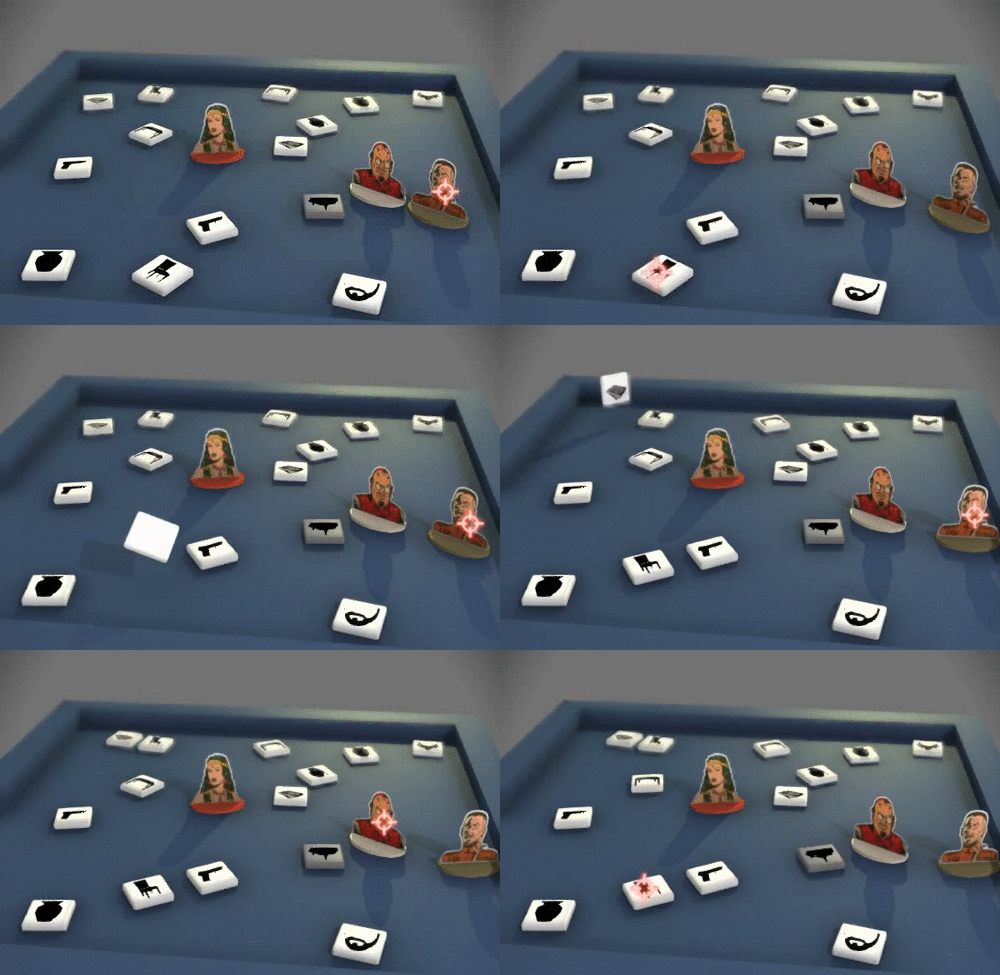
I've been putting in a few hours on my spy themed virtual board game on Saturday evenings. Today I refactored a lot of code to start ramping up from the single-encounter prototype with minimal mechanics to a scalable game engine.
The first distinction was having a container class for each encounter, which is a room. I call these Locations in the code, since sometimes they might be outside or in areas that aren't "rooms" properly. The design calls for the players to move as a group through the Locations. Beating the challenge in one unlocks one or more paths. Satisfying the winning conditions for a mission will require traversing most of the rooms on a map.
Adding Location was straightforward, but I had to change all of the initialization code to build each one separately rather than dumping everything straight into the world. I ended up having Location as a subclass of G3D::MarkerEntity, which is intended for invisible objects like spawn points and gameplay triggers. This naturally gives it bounds and allows it to exist in the world without a visual representation.
Location manages placement of objects. It ensures that every object is in a location that can be seen from the camera. There was an ordering ("chicken and egg") problem in that midway through being initialized some objects insert other objects into the Location and the partly initialized objects don't have proper bounding boxes. I solved this by having Location force any partly initialized object to immediately simulate itself for 0 seconds and then pose for rendering, thus ensuring a valid coordinate frame and bounding box before it can trigger insertion of other objects that might overlap the box.
The animation subsystem uses a class called Transition that computes splines between positions for moving objects and reserves the target position space with an invisible bounding box so that nothing can occupy an intended landing position before the moving object reaches it. There is no dynamic physics in the game--everything is handled with ballistic splines that are computed as soon as an object begins to move. This design was inspired by a relatively old computer graphics paper by Barzel et al. on Plausible Animation: given the desired end state, solve backwards for the initial conditions that give you what you want. Notice in the animation below that the "tumbling" pieces always land face up, at no more than a 45-degree angle, and in locations that are visible to the final camera position.
To create some visual progress in addition to this infrastructure improvement, I made objects and the camera Transition to their starting positions instead of simply spawning there. This creates a nice camera track that zooms in to the starting room, and the playing pieces appear to rain down from above. I think that this helps maintain the board game aesthetic, and only required four additional lines of code:
Morgan McGuire is a professor of Computer Science at Williams College and a professional game developer. He is the author of The Graphics Codex, an essential reference for computer graphics that runs on iPhone, iPad, and iPod Touch.
The first distinction was having a container class for each encounter, which is a room. I call these Locations in the code, since sometimes they might be outside or in areas that aren't "rooms" properly. The design calls for the players to move as a group through the Locations. Beating the challenge in one unlocks one or more paths. Satisfying the winning conditions for a mission will require traversing most of the rooms on a map.
Adding Location was straightforward, but I had to change all of the initialization code to build each one separately rather than dumping everything straight into the world. I ended up having Location as a subclass of G3D::MarkerEntity, which is intended for invisible objects like spawn points and gameplay triggers. This naturally gives it bounds and allows it to exist in the world without a visual representation.
Location manages placement of objects. It ensures that every object is in a location that can be seen from the camera. There was an ordering ("chicken and egg") problem in that midway through being initialized some objects insert other objects into the Location and the partly initialized objects don't have proper bounding boxes. I solved this by having Location force any partly initialized object to immediately simulate itself for 0 seconds and then pose for rendering, thus ensuring a valid coordinate frame and bounding box before it can trigger insertion of other objects that might overlap the box.
The animation subsystem uses a class called Transition that computes splines between positions for moving objects and reserves the target position space with an invisible bounding box so that nothing can occupy an intended landing position before the moving object reaches it. There is no dynamic physics in the game--everything is handled with ballistic splines that are computed as soon as an object begins to move. This design was inspired by a relatively old computer graphics paper by Barzel et al. on Plausible Animation: given the desired end state, solve backwards for the initial conditions that give you what you want. Notice in the animation below that the "tumbling" pieces always land face up, at no more than a 45-degree angle, and in locations that are visible to the final camera position.
To create some visual progress in addition to this infrastructure improvement, I made objects and the camera Transition to their starting positions instead of simply spawning there. This creates a nice camera track that zooms in to the starting room, and the playing pieces appear to rain down from above. I think that this helps maintain the board game aesthetic, and only required four additional lines of code:
One visual direction rule that I've enforced throughout development is that objects should never appear or disappear. To remove or add a piece it must transition to or from an occluded area or outside the frame. This makes them feel solid and real.
The whole game is now up to 1800 SLOC of C++ and JavaScript. I remain concerned to be approaching 2k lines for the project but see few opportunities to reduce the amount of code at this stage. Each C++ class is about 150 lines and I use a fairly deep inheritance tree to avoid code duplication. The webserver aspect naturally introduces some boilerplate and the client is about 700 lines of JavaScript broken across a few files.
The next steps are to create a map with multiple locations and to transition between them. I currently have mechanics implemented for picking objects up, dropping them, handing them to other characters, and shooting the pistol. I'd like to take on other interaction mechanics next: conversing, melee weapons, and actions like lock-picking.
Morgan McGuire is a professor of Computer Science at Williams College and a professional game developer. He is the author of The Graphics Codex, an essential reference for computer graphics that runs on iPhone, iPad, and iPod Touch.
Saturday, April 6, 2013
Shooting Mechanics for Spy Game
I put in some more work on my spy-themed virtual board game tonight. I added sound using fMOD and implemented shooting mechanics:
Tuesday, April 2, 2013
Spy Virtual Board Game
I've been working on a spy-themed virtual board game as a hobby project from a game jam last weekend. Unfortunately, I had the flu and couldn't really complete the jam, but I did make enough progress on the game from scratch to become excited about it. It already served the purpose of helping to flush bugs and motivate new features for G3D, codeheart.js, and mongoose, the main libraries that it uses. I hope to put in work from time to time as a hobby project.
The game uses multiple screens. The main screen is the game board seen by everyone. Each player also has a web browser (ideally on a multi-touch mobile device, but any HTML5 browser works) to view his or her private hand of cards and initiate actions. There are no controllers used except for these browsers.
Here's a photograph from the first time I successfully connected the mobile device to the main game using a QR code and an iPod's camera:
At that point, my goal was to make a 3D tactical game, inspired by XCOM. The game quickly evolved into this virtual board game:
The switch to board game mechanics and visuals was initially motivated by the limited time that I had to create artwork for the game jam. However, as I started to map out the gameplay, I realized that the increased abstraction of a boardgame allows much deeper gameplay. A tactical spy game at a simulation level would turn into Splinter Cell or Monaco (both fine games), where fine-detail movement, combat, lock picking, etc. dominated. I wanted much higher-level and emergent gameplay, such as planting evidence, conversations, crafting (MacGuyver & A-Team style). Abstracting interactions (similar to Munchkin's abstraction of D&D encounters) allows the player's imagination to fill in details as well, and imagination is the best graphics (see Doom I, Alien, and...books, etc.).
Tonight I implemented the animations for characters picking up, dropping, and giving each other equipment, as shown in this video:
Morgan McGuire is a professor of Computer Science at Williams College and a professional game developer. He is the author of The Graphics Codex, an essential reference for computer graphics that runs on iPhone, iPad, and iPod Touch.
The game uses multiple screens. The main screen is the game board seen by everyone. Each player also has a web browser (ideally on a multi-touch mobile device, but any HTML5 browser works) to view his or her private hand of cards and initiate actions. There are no controllers used except for these browsers.
Here's a photograph from the first time I successfully connected the mobile device to the main game using a QR code and an iPod's camera:
At that point, my goal was to make a 3D tactical game, inspired by XCOM. The game quickly evolved into this virtual board game:
Main Screen
Mobile Screen
Tonight I implemented the animations for characters picking up, dropping, and giving each other equipment, as shown in this video:
The current implementation is currently 1421 SLOC in C++ and JavaScript (including the object database) and about 3MB of image data files. That's tiny by most project standards but already large enough to concern me. Hobby projects bit-rot quickly because they aren't tested on daily as the underlying APIs evolve. This is also code with a substantial amount of multithreading, which greatly increases the logical complexity and risk that large amounts of code have bugs. There are about 10 threads active at all times to communicate with the mobile devices and load resources to them over asynchronous channels. That's necessary, but also nine too many for comfort.
When I next have an evening to hack on this, the next step is debugging some instabilities arising from all of those threads. I can then move on to implementing actions taken using the fun equipment and skills that are currently in the game in name and stats only but don't yet function.
Morgan McGuire is a professor of Computer Science at Williams College and a professional game developer. He is the author of The Graphics Codex, an essential reference for computer graphics that runs on iPhone, iPad, and iPod Touch.
Monday, March 11, 2013
JavaScript Doc Strings
codeheart.js is an open source 2D web and mobile game Javascript framework designed to be extremely easy to learn and use, even for non-programmers. In fact, it intentionally avoids providing many support routines in order to encourage learning to program (this also allows advanced programmers to include or write their own rather than having a structure imposed). I'm writing a book to help new programmers learn codeheart.js, but also needed an online reference for the 112 API entry points.
Friday, February 15, 2013
Upcoming Graphics Codex 1.9 Features
I'm now working on a number of interactive features for the next update of The Graphics Codex to really take advantage of the mobile app (vs. printed book or PDF) platform. It is already the case in version 1.8 that some of the diagram tables link to more information about a specific topic, for example, some of the elements in the radiometric quantities table shown below on iPad mini
link to detailed information about that quantity and how it is measured.
Screen Capture Animated GIF on OS X
Animated GIF is a terrible video format: a 256 color palette with a low compression ratio that trashes bandwidth and still looks bad. Unfortunately, browser vendors failed to agree on a modern video standard and many APIs (including Twitter and most HTML tags) don't support video in any format in place of images, so Animated GIF is the best that there is for embedding video inside other APIs.
Short animated GIFs suitable for posting on Twitter are simple and free to create on OS X. I use the free OS X App Screen Record Pro-Lite to capture a QuickTime (MOV) format video of a screen region and then convert the MOV to GIF online at http://www.online-convert.com/. To produce an MP4 video instead, I could convert the MOV online or using iMovie.
I haven't been able to post animated GIF files to Twitter via their web interface, but the (also free) official Twitter app for OS X allows posting them by dragging the GIF into a new tweet window.
Morgan McGuire is a professor of Computer Science at Williams College and a professional game developer. He is the author of The Graphics Codex, an essential reference for computer graphics that runs on iPhone, iPad, and iPod Touch.
Tuesday, January 8, 2013
Computer Science for Other Domains
![]() |
| Crytek Sponza rendered by CS371 students with photon mapping |
In the process of presenting the CS371: Computer Graphics that I teach at Williams College as an ACM/IEEE 2013 Curriculum for Computer Science exemplar in computer graphics, I had to answer the question, "why do you teach the course this way?" The the answer that I provided is below. It is currently a core part of my philosophy for teaching science at a liberal arts college*.
Wednesday, August 29, 2012
Sol LeWitt's Art and Computer Science
Sol LeWitt was an early conceptual artist whose work I was first introduced to my first year at college by Prof. Bill Porter. His work is computational and geometric, yielding images in the space between graphic design and fine art.
Yale University, Williams College, and MASS MoCA collaborated on a long-term retrospective of his work that, because his work is created directly on the walls under the direction of the artist, will probably be the final gallery showing of his wall drawings ever. Below is the piece that I wrote for a related show on LeWitt at Williams, discussing how I use his artwork in my computer graphics and data structures courses.
Tuesday, August 7, 2012
Separating the Socket.IO application and web server
This post describes how to write a simple JavaScript program with real-time client server interaction that works with a regular web server instead of creating a custom one in Node.js. This is the framework that you probably want for extending your website with network-based interactive elements or writing a browser based multiplayer game. My previous posts explained how to install Node.js and Socket.IO and how to write your first Socket.IO program. This series is essentially a transcript of what I learned while setting up multiplayer game examples for codeheart.js.
At a command prompt, type:
sudo apachectl start
That launches your webserver. Place the files described in the following sections in the
/Library/WebServer/Documents
directory. The file is writeable only by root in the default install, so I ran:
sudo chown $username /Library/WebServer/Documents
chmod u+rwx /Library/WebServer/Documents
to be able to easily modify its contents from my developer account. To stop your web server, remember to execute:
sudo apachectl stop
when you're done testing. The web server will automatically stop if you reboot your machine as well.
The server program is just:
app.js
The client side application is stored on the web server. It is then downloaded to the client by a web browser and executed locally. On your server, you need to store the following index.html file and the complete contents of the node_modules/socket.io/node_modules/socket.io-client/dist/ directory, which were created by the install of the server-side Socket.IO library. Put the contents of that directory into a socket.io directory, so that you have a directory structure on your web server like this:
(if you're running your web server on OS X Mountain Lion, then this is the contents of your /Library/WebServer/Documents directory).
The index.html file for this demo is:
Now load the page in your browser, for example, by pointing your browser at http://localhost/index.html
You should see the following:
The green box had its color changed from red by a message from the server. The text in quotes in the black box was transmitted by the server.
The code above shows how to connect, modify an HTML page based on network messages, and how to filter different kinds of messages. That's everything that you need in order to build arbitrary networked browser-based applications in JavaScript.
Running a Web Server on OS X Mountain Lion
The point of this post is to extend your existing web server, which assumes that you have a web server. If your site is hosted somewhere else, you can just upload the files described below to it. If you are testing or are running directly on OS X Mountain Lion, you can do the following to launch the web server. Note that OS X Lion and earlier had a GUI for launching the web server directly in the Sharing pane of Preferences, but that was removed in Mountain Lion.At a command prompt, type:
sudo apachectl start
That launches your webserver. Place the files described in the following sections in the
/Library/WebServer/Documents
directory. The file is writeable only by root in the default install, so I ran:
sudo chown $username /Library/WebServer/Documents
chmod u+rwx /Library/WebServer/Documents
to be able to easily modify its contents from my developer account. To stop your web server, remember to execute:
sudo apachectl stop
when you're done testing. The web server will automatically stop if you reboot your machine as well.
Creating the Server-side Application
I'm going to call the server-side application app.js. It will run under Node.js. It can run on a different machine from the web server, although for simplicity in testing I'm going to describe running them both on the same machine. The point is that the application is on a different port from the web server and only handles network traffic directly related to the application. It does not serve files to web browsers.The server program is just:
app.js
// Listen on port 1080 (arbitrarily chosen here and in index.html
var io = require('socket.io').listen(1080)
io.sockets.on('connection', function (socket) {
socket.emit('myMessageType', 'Hello world');
// Example of how the client can filter for messages. This one
// will not go to the messages log. Instead it will change the
// color of a square.
socket.emit('colorMessage', {color: '#0F0'});
socket.on('myResponseType', function (data) {
console.log(data);
});
});
You run it by typing:
sudo node app.js
at the command line. Note that you must have previously installed Socket.IO in the same directory (see previous post on how to install Node.js and Socket.IO).
Creating the Client-side Application
The client side application is stored on the web server. It is then downloaded to the client by a web browser and executed locally. On your server, you need to store the following index.html file and the complete contents of the node_modules/socket.io/node_modules/socket.io-client/dist/ directory, which were created by the install of the server-side Socket.IO library. Put the contents of that directory into a socket.io directory, so that you have a directory structure on your web server like this:
(if you're running your web server on OS X Mountain Lion, then this is the contents of your /Library/WebServer/Documents directory).
The index.html file for this demo is:
<html>
<head>
<!-- Load Socket.IO from our web server, which is separate from the
application's server. -->
<script src="http://localhost/socket.io/socket.io.js"></script>
<script>
// Tell Socket.IO where to find the Flash component if the browser needs it.
WEB_SOCKET_SWF_LOCATION = 'http://localhost/socket.io/WebSocketMain.swf';
</script>
</head>
<body>
<h1>Socket.IO Demo</h1>
<!-- A log for messages -->
<div id="messages" style="border: 1px solid #000; width: 100%; color: #0F0; background: #000; font-family: monospace;">
Connecting to server...<br/>
</div>
<div id="colorsquare" style="border: 1px solid #000; width: 32px; height: 32px; background: #F00; margin-top: 10px;"></div>
<script>
// Make the output visible
var messages = document.getElementById('messages');
// Connect to our app.js, which is listeninging on port 1080
var socket = io.connect('http://localhost:1080');
socket.on('connect',
function() {
messages.innerHTML += 'Connected<br/>';
});
socket.on('myMessageType',
function(data) {
messages.innerHTML += 'Server says: "' + data.toString() + '"<br/>';
// Respond to the server
socket.emit('myResponseType', { my: 'data' });
});
socket.on('colorMessage',
function(data) {
document.getElementById('colorsquare').style.background = data.color;
});
</script>
</body>
</html>
In this case, I'm assuming that both the web server and node are running on the local machine. If you have a different web server, replace "localhost/" with your server's name (but do not replace "localhost:1080/"... that's Node.js's server!)Now load the page in your browser, for example, by pointing your browser at http://localhost/index.html
You should see the following:
The green box had its color changed from red by a message from the server. The text in quotes in the black box was transmitted by the server.
The code above shows how to connect, modify an HTML page based on network messages, and how to filter different kinds of messages. That's everything that you need in order to build arbitrary networked browser-based applications in JavaScript.
Getting started with Socket.IO
Socket.IO is a library for Javascript (and ported to other languages) that provides client-server network connections. Under the hood it uses WebSockets, Flash, ActiveX, and other tools to provide an implementation that works on many browsers. It is a great tool, but the documentation is poor. So here's some information about how to get started that is missing from the manual.
Saturday, August 4, 2012
Installing Node.js and Socket.IO
This blog post describes how to set up Node.js for writing server code in Javascript. The following two posts show how to get started with Socket.IO and how to separate the web server and application server.
Tuesday, July 31, 2012
The Journal of Computer Graphics Techniques
I'm the Editor in Chief of the Journal of Computer Graphics Techniques (JCGT), the free, peer-reviewed, and open access journal of computer graphics practice. JCGT was founded in May 2012 by an influential group of computer graphics experts. Our goal is to document and advance the state of the art, in the way that Graphics Gems and the Journal of Graphics Tools (jgt) each did. I don't mention those two publications casually. Both were created by Andrew Glassner, who is on the new JCGT advisory board, and all former jgt Editors-in-Chief and most of the 2012 jgt editorial board now serve on the JCGT board.
Next week, most of the JCGT board will be at SIGGRAPH. I encourage anyone to talk to them about the new journal. The numbers alone are fascinating for a brand-new scientific publication with no commercial advertising:
- 512 followers of @JCGT_announce on Twitter.
- 140 followers on Facebook
- 10,000 downloads in four weeks for the first JCGT paper, Hery and Ramamoorthi's, Importance Sampling of Reflection from Hair Fibers.
I've received a lot of great questions by e-mail and in person at conferences about the nuts and bolts of the journal, such as how we handle copyright and publishing. Many of these are addressed on the submissions page of the website. I plan to add new information to the website in September about how our back-end systems work. This is important for helping others to create online scholarly publications and for explaining how papers published in JCGT will be available indefinitely despite inevitable change in how electronic documents are stored and retrieved.
Ronen Barzel suggested that I share the answer to one common question that many people are simply curious about: how is the JCGT board funding the journal?
Second, Williams College has a grant from the Mellon Foundation to create digital archives to match the quality and reliability of the college's substantial physical scholarly archives. Those physical archives are in rare books, visual art, scholarly journals, and congressional papers. I find the breadth and depth of those fascinating: the college's holdings include original drafts of the US Declaration of Independence and Constitution, first editions of major scientific works such as Principia Mathematica , and paintings by major artists such as Picasso. The college is well-positioned to archive and conserve digital computer graphics papers and unlike a commercial publisher, an academic library has no agenda for those materials beyond preserving knowledge for all.
Third, the minor incidental costs of advertising, hosting, and legal are being picked up out of pocket by a few of us. Of of the financial contributions and dues I've given to graphics organizations, this was the one I was most pleased to make. We're not accepting donations or seeking outside funding--that would subject us to bookkeeping overhead and legal requirements. If you want to support the journal, the best way to do so is to read it, write for it, and offer your services as a reviewer.
Subscribe to:
Posts (Atom)


.gif)